Browser Extensions have a simple structure that has crucial security considerations.
In this article we are going to compare the structure and function of a basic cell and Chrome browser extension architecture.
I'm not dragging anyone back to biology class but...each of these simple cellular components are important for human health (security) of the body.
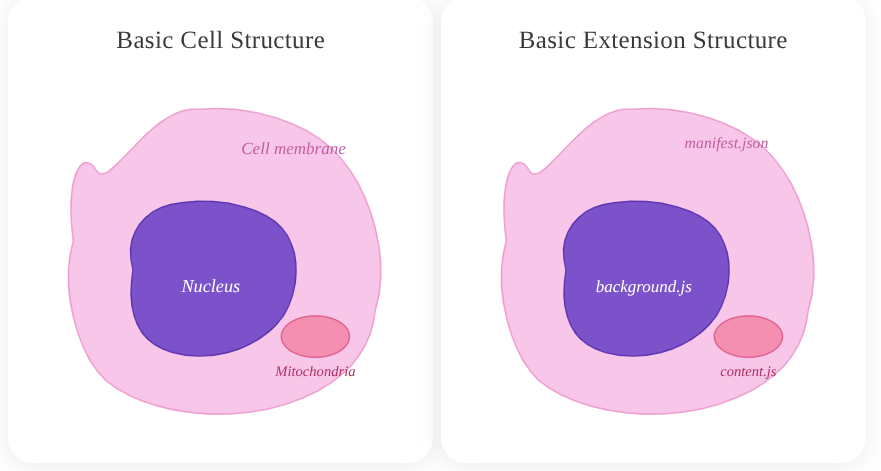
Basic Cell Structure
- Cell Membrane -> Shields the cell from oxidative threats and is a selective permeable layer.
- Nucleus -> The brain or "command center" of the cell. It houses the cell's genome and is the repo of genetic information.
- Mitochondria -> The powerhouse of the cell, generating 90% of the ATP for cellular functions. They are dynamic and active agents, influencing cell shape.
The same is true of the components that make up Chrome Extensions. A significant part of the health of modern browsers, protection of sensitive user and company data depends on secure browser extension management.
To understand how to keep extensions healthy, understanding the architecture is paramount. German physician Rudolf Virchow established that diseases arise from malfunctions at the cellular level. The same is true of tiny pieces of software, browser extensions. They can cause catastrophic destruction to users and companies if not properly managed.
Understanding extension architecture is the first step toward preventing that damage.
CELL STRUCTURE COMPARED TO EXTENSION ARCHITECTURE
To reiterate, I am no biologist but this comparison seems fitting when observing the browser threat landscape. Understanding the risks on a basic level will build in security teams the bridge to discerning the potential dangers and risks associated with these albeit small but powerful pieces of software.
Basic Extension Structure
- Manifest.json -> All extension permissions, the content security policy (CSP) and extension configuration lives in this file.
- Background.js -> Full extension api access, privileged context, cross origin requests if allowed. No direct DOM access.
- Content.js -> Runs in webpage context, chrome.runtime API access, shared DOM access, separate JS namespace. Very dynamic in operations with DOM data.
Cell Membrane ↔ manifest.json
The cell membrane is selective about what it allows into a cell. When compromised, the cell's structure becomes more permeable allowing toxins inside.
Similarly, a misconfigured manifest.json is a huge attack vector in malicious extensions. For example, over 100 malicious Chrome extensions were found abusing its permissions fields to bypass Chrome's Content Security Policy and silently access every site a user visits.
Controls
To keep manifest.json secure, protecting "the membrane" do the following:
- Executing more thorough audits workflows, peering into the manifest.json of an extension before installation is critical.
- Manually inspect extension source code via crxviewer.com -> followed by the URL or extension id found in the Chrome Web Store reveals this code without downloading it.
- Utilize risk assessment platforms like:
- LayerX
- SquareX
- Enforce enterprise extension approval workflows, extensions should be blocklisted by default.
Manifest Audit Checklist:
- [ ] Only necessary permissions requested
- [ ] Host permissions minimized
- [ ] Optional permissions used where possible
- [ ] Permission justifications should be documented
Nucleus ↔ background.js
A damaged nucleus loses control of gene expression and the cell "simultaneously poisons itself and runs out of energy." This can cause self-destruction of a cell. The nucleus' retro communication can also be disrupted when under stress and attack from "pathogens".
In the real-world 2024 Cyberhaven breach, a malicious background.js (worker.js) established a live connection to a command-and-control server and downloaded attack instructions post-installation; fully bypassing Chrome Web Store review because the logic loaded remotely, not from the reviewed code.
Remote code execution (RCE) remains a serious threat within extensions. Malicious code can exploit the message api functionality used by backgound.js and content.js. This requires thoughtful development and safeguards via validating strict send/receive measures.
To avoid the "poison from within" scenario in your infrastructure:
Controls
- CSP (Content Security Policy) Lockdown: Ensure the manifest strictly forbids
unsafe-evalor remote script loading. If the "Nucleus" can’t call out to unknown servers, it will not receive malicious instructions. Some extensions do not have this fundamental protection at all, be on the lookout! - Network Monitoring: Use EDR or specialized browser security tools to monitor for unusual outbound traffic originating from the extension’s background process (e.g., connections to unknown C2 domains).
- Manifest V3 Migration: Force the move to Manifest V3, which replaces background pages with Service Workers. This limits the "lifespan" of the nucleus, making it harder for persistent malicious connections to stay active.
Mitochondria ↔ content.js
Dysfunctional mitochondria generate toxic reactive oxygen species (ROS) instead of energy, when attacked by pathogens. These pathogens can hijack the cell causing the aforementioned issues; damage that originates inside the cell, destroys it from the inside out.
The content.js file carries the same risk profile. The content.js extension file is the only one that runs directly inside web pages
This is where sensitive information resides, making it the prime target for side-channel attacks and cross-site-scripting from threat actors; the "pathogens".
- Session tokens
- Authentication credentials
- DOM data
- AI Sidebar data
- Financial Forms
For instance, in the Cyberhaven breach, it was specifically content.js that harvested session tokens and credentials from Facebook and AI platforms in real time.
Controls
- Principle of Least Privilege: Does the extension truly need access to https://* /*, or can it be restricted to certain domains?
- Runtime Host Permissions: These can be restricted in Google Admin, effectively creating "Block-lists" and "Allow-lists" where extensions can run.
- MDM or GPO Policies: These tools can configure the browser and restrict browser extension permission capabilities.
- Chrome Workspace Settings: Devices -> Chrome -> Settings -> Users & Browsers -> Extension Install Force-list.
- Isolated Worlds: Developers should explicitly add this declaration, even though this is enabled by default by Chrome. This is a helpful secure coding practice, similar to documenting your code. Comments are not needed but help anyone else looking at your code and will help you later on. Chrome has gone to great lengths to sandbox and isolate components of extensions for security. However this still does not stop a threat actor from utilizing messaging api(s) to communicate asynchronously with background.js <-> content.js
{
  "manifest_version": 3,
  "name": "Cellular Security Extension",
  "version": "1.0",
  "content_scripts": [
    {
      "matches": ["https://*.example.com/*"],
      "js": ["content.js"],
      "world": "ISOLATED"
    }
  ]
}
Historical Citations
Cells have what is called Immunological memory, which is the adaptive ability of the immune system to recognize pathogens encountered previously and respond effectively upon re-exposure.
Astutely researching and staying up-to-date on the most recent exploits/CVE(s) helps "immune memory" efforts against threat actors.
CVE-2024-10229 – Remote Bypass of Site Isolation: A high-severity vulnerability in Chrome’s extension handling that could allow a crafted malicious extension to break site isolation, exposing data across tabs and domains.
CVE-2024-9964 – UI Spoofing via Malicious Extensions: This CVE showed how a malicious extension could spoof the Chrome Payments UI and trick users into authorizing fraudulent actions — even though it required interaction, it illustrates misuse of extension injection capabilities.
CVE-2025-9866 – CSP Bypass in Extensions: A more recent vulnerability where a crafted HTML page could exploit Chrome’s extension content-security policy handling, enabling potential bypasses that lead to unauthorized access or data leakage.
Taking lessons from previous vulnerabilities strengthens defensive measures in the future.
CLOSING NOTES
Proper Browser Extension management should be taken seriously.
AI integrated extensions and productive tools are increasing the browser attack surface. These are helpful tools that can greatly enhance productivity, but do not treat them as harmless add-ons.
Secure your extension “cell”:
- Cell membrane →
manifest.json - Nucleus → background.js /
service worker - Mitochondria → `content.js`
Healthy architecture prevents systemic failure.
Remember these small software components can have a massive blast radius.
SOURCES
Immunological Memory (ASM)
https://asm.org/articles/2023/may/understanding-immunological-memory
CVE-2024-10229 (NVD)
https://nvd.nist.gov/vuln/detail/CVE-2024-10229
CVE-2024-9964 (NVD)
https://nvd.nist.gov/vuln/detail/CVE-2024-9964
CVE-2025-9866 (Wiz)
https://www.wiz.io/vulnerability-database/cve/cve-2025-9866

Member discussion: